14. Offboarding & shared mailboxes
When someone leaves, deleting their mailbox outright loses history and breaks colleagues who still need the mail. Scalio Nexus can instead convert a leaver's mailbox into a shared mailbox, keep it for a retention window, remind you before it's deleted, and let you reactivate the person in one click if they return.
Shared mailbox on leave
Configure this under Settings → Lifecycle → Shared mailbox conversion.
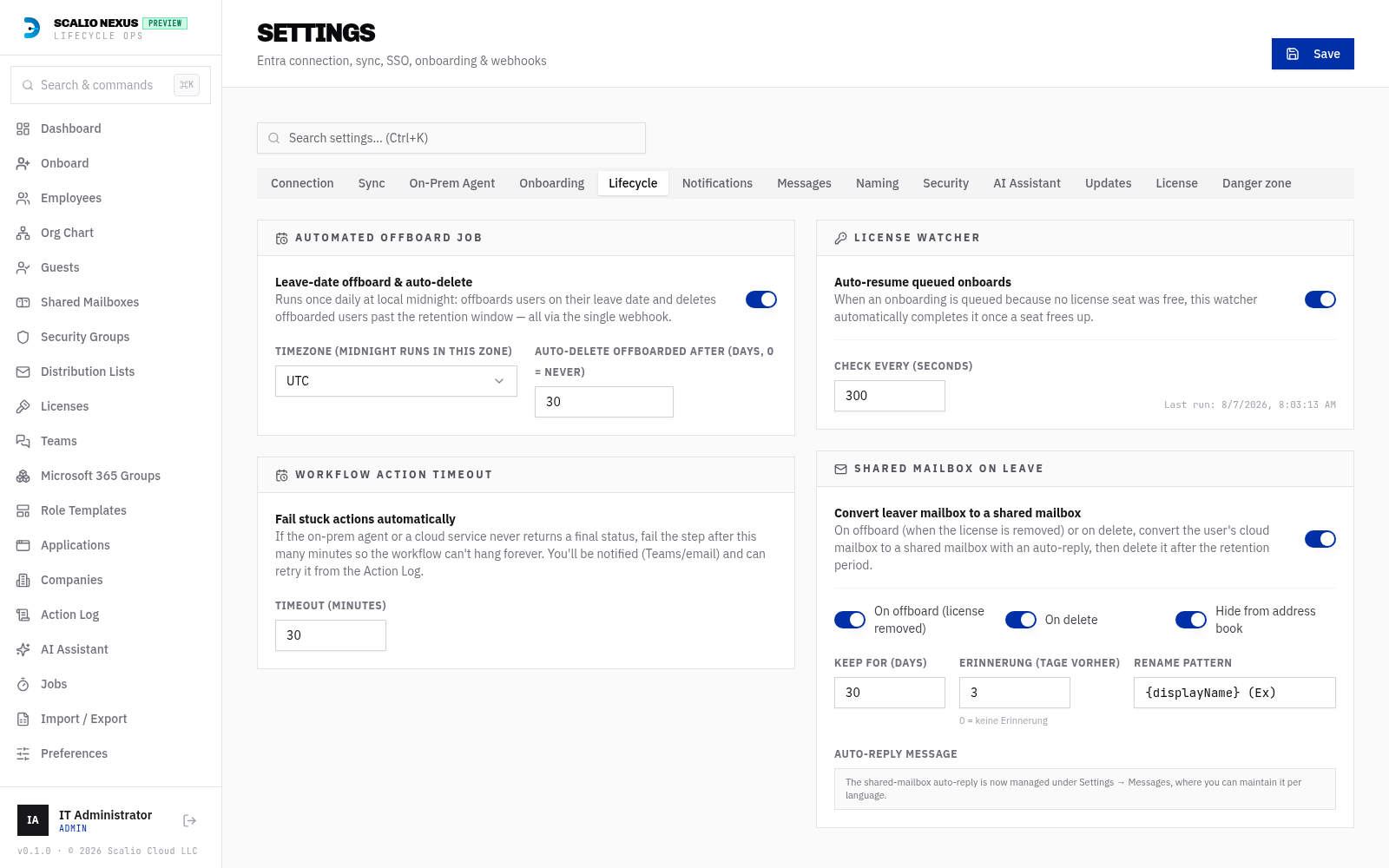
| Setting | Meaning |
|---|---|
| Enabled | Convert a leaver's mailbox to shared when licenses are removed on offboard. |
| Rename pattern | The new display name, e.g. {displayName} (Ex). |
| Hide from GAL | Hide the shared mailbox from the Global Address List. |
| Keep days | How long to retain the shared mailbox before it is auto‑deleted (e.g. 30). |
| Erinnerung (Tage vorher) | Days before deletion to send a reminder (default 3; 0 disables). |
What happens on offboard (with licenses removed):
- The mailbox is converted to a shared mailbox in Exchange Online.
- It is renamed per the pattern, hidden from the GAL, and an auto‑reply is set.
- A retention record is created with the deletion date (Keep days from today).
Cloud‑only vs hybrid
The conversion behaves differently depending on where the object is mastered:
Everything is done directly in Exchange Online — convert to shared, rename, hide from the GAL, set the auto‑reply.
DisplayName and hide‑from‑GAL are mastered on‑premises — Exchange Online rejects those
writes for a synced object. So Scalio Nexus applies them on the on‑prem AD object via the agent
(display name + msExchHideFromAddressLists) and Entra Cloud Sync propagates them. Exchange
Online still performs the convert‑to‑shared and the auto‑reply (neither is dirsynced).
Agent requirement
The on‑prem agent must be able to write msExchHideFromAddressLists (Exchange schema) for the
GAL‑hide to take effect on hybrid mailboxes. See the agent spec for the updateUser contract.
Retained mailboxes — the panel
On the Shared Mailboxes page, an amber “Aufbewahrte Postfächer (Austritt)” panel lists every retained mailbox with a countdown to its deletion (red ≤ 2 days, amber ≤ 7 days, green otherwise) and two actions.

Extend
Verlängern pushes the auto‑deletion date out by a number of days you choose and re‑arms the reminder — use it to hold a mailbox longer while a decision is pending.
Reactivate (restore a returning leaver)
Reaktivieren brings the person back in one click:
- Converts the shared mailbox back to a regular user mailbox.
- Restores the original display name and un‑hides it from the GAL (on hybrid, applied on‑prem + Cloud Sync, mirroring the convert flow).
- Turns the auto‑reply off, re‑enables sign‑in, and cancels the scheduled deletion.
Assign a license after reactivating
Reactivate deliberately does not assign a license (to avoid silently consuming a seat). A regular mailbox needs a license to persist, so the app shows a banner prompting you to assign one to the reactivated user.
The retention timeline
Offboard (licenses removed)
        │
        ▼
  Shared mailbox  ──(Keep days)──▶  Reminder (N days before)  ──▶  Auto‑delete
        │                                    │
   Extend (any time)                    Reactivate (any time) ─▶ regular user mailbox (assign a license)
Leaver archive & Reentry (rehire)
Every offboard writes a read-only snapshot of the person into the Leaved employees archive
(/employees?filter=leaved). Crucially, the snapshot is taken from live Microsoft Graph at offboard
time — not the local cache — so it captures what the leaver actually had:
- Groups and distribution lists (distribution-classified groups are archived too),
- Direct licenses (group-inherited licenses are excluded — they come back with the group),
- Teams memberships, and
- Shared-mailbox delegations — which shared mailboxes the person held FullAccess / SendAs on (captured with a one-pass Exchange Online scan when EXO is connected; best-effort, never blocks the offboard).
Forward-looking
The snapshot is captured at offboard time. Users offboarded before this capability was added have empty snapshots — reentry can still re-enable such accounts, but cannot auto-restore old access that was never recorded.
Reactivatable badge & filter
In the Leaved list, leavers whose tenant account still exists show a green “Reaktivierbar” (reactivatable) badge. A “Nur reaktivierbare” (reactivatable only) toggle filters the list to just those users — handy when processing rehires.
Grace countdown & Extend (+7 / +30 / +90)
The Leaved detail page header shows the shared-mailbox grace countdown (“Shared-Mailbox-Frist: noch N Tage”) when the leaver's mailbox is in retention. A “Frist verlängern” dropdown next to it pushes the auto-deletion date out by 7, 30 or 90 days and re-arms the reminder — the same effect as Extend on the Shared Mailboxes panel, right where you decide whether to bring the person back.
Reentry (rehire)
Reentry brings a leaver back and is available in two places:
- the Neueintritt button on the Leaved detail page, and
- the Onboarding → “Von Benutzer klonen” step — selecting a leaver whose account still exists reveals a Reentry card (otherwise the normal clone-to-new-account flow applies).
Both open a confirmation dialog listing exactly what will be restored — group/DL, Teams and license counts plus the shared-mailbox names — before anything happens.
When the account still exists (disabled, or a grace-period shared mailbox), reentry reactivates the same object:
- Converts a grace-period shared mailbox back to a regular mailbox and cancels its scheduled deletion.
- Re-enables sign-in.
- Restores the archived groups/DLs and Teams (skipping dynamic groups, and on-prem groups on a cloud-only account).
- Re-assigns direct licenses where a seat is free; any without a free seat are returned so the UI can prompt you to assign one.
- Restores shared-mailbox delegations (FullAccess/SendAs) via Exchange Online.
- Removes the person from the Leaved archive — they're an active employee again.
When the account was deleted from the tenant, reentry routes to the Onboarding clone flow to recreate a fresh account, pre-filled from the snapshot.
Compliance audit trail
Every reentry writes an immutable entry to the Activity log (category “Wiedereintritte”) recording who ran it, when, and a breakdown of what was restored (groups / teams / licenses / shared mailboxes).
Welcome-back email
When a leaver is reactivated, Scalio Nexus can email a welcome-back summary of the restored access to the returning employee's manager (resolved from the directory), and — with the “CC the employee” toggle — to the employee too.
- Enable it under Settings → Lifecycle → “Willkommen-zurück-E-Mail (Neueintritt)” (with the CC toggle).
- Edit the message under Settings → Messages → “Willkommen-zurück-E-Mail” — a multi-language
(English + German) subject + body template with a live preview and test send, like the other message
templates. Placeholders include
{displayName},{manager},{upn},{groups},{teams},{licenses},{sharedMailboxes}and{summary}(a formatted list of the restored access).