3. The dashboard
The dashboard is your landing page. It summarises the tenant at a glance:
- Key stats — active users, recent joiners/leavers, pending items.
- Recent actions — the latest lifecycle workflows and their status.
- Live workflows — anything currently running.
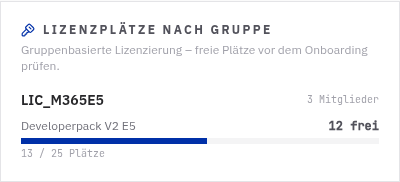
- Seat usage (group‑based licensing) — a live per‑group breakdown of how many license seats are used vs free for each licensing group, sorted by scarcity (the tightest group first).
Seat usage
For every group used for group‑based licensing, the Seat usage card shows the assigned SKU(s) with used / total / free seats. Member counts are read live from Microsoft Graph. Each group gets a colour‑coded free‑seat badge — green (healthy), amber (getting tight) or red (at/over the low‑seat threshold).
Low‑seat banner
When a licensing group drops to or below the configured low‑seat threshold, a banner appears so you can top up seats before onboarding is blocked. Admins can also have this alert delivered to Teams / email — see Notifications. Onboarding itself is guarded: if you pick a licensing group with no free seats, the onboarding form blocks the create with a clear message.
The old “License capacity” widget has been replaced by the per‑group Seat usage card above.
The old “setup checklist” card has been removed from the dashboard to reduce clutter. Setup is now handled from the Setup Wizard and Settings → Microsoft 365 (for administrators).
If setup is incomplete, administrators still see a slim banner linking to the guided setup.